DELMIA Factory Simulation Engineer

Factory Simulation Engineer

Optimize your production layout before moving a single machine.

Build a full digital twin of your factory, test layout changes, find bottlenecks, and validate throughput — all before committing to a single equipment move.

Factory Simulation Engineer

Factory Simulation Engineer is a DELMIA role on the 3DEXPERIENCE platform that lets you build a complete digital replica of your production facility — and put it to work before you move any physical equipment. You can model every machine, workstation, conveyor, and resource, then run process simulations to see exactly how your factory behaves under different operating conditions.

  • Simulate flow, cycle times, throughput, and bottlenecks virtually
  • Supports greenfield design and brownfield reconfiguration
  • Fix layout inefficiencies before physical rearrangement
  • Import floor plans, CAD models, or point cloud data
  • Test what-if scenarios without taking equipment offline
  • Connected to SOLIDWORKS design and manufacturing tools
  • One simulation run can prevent months of disruption
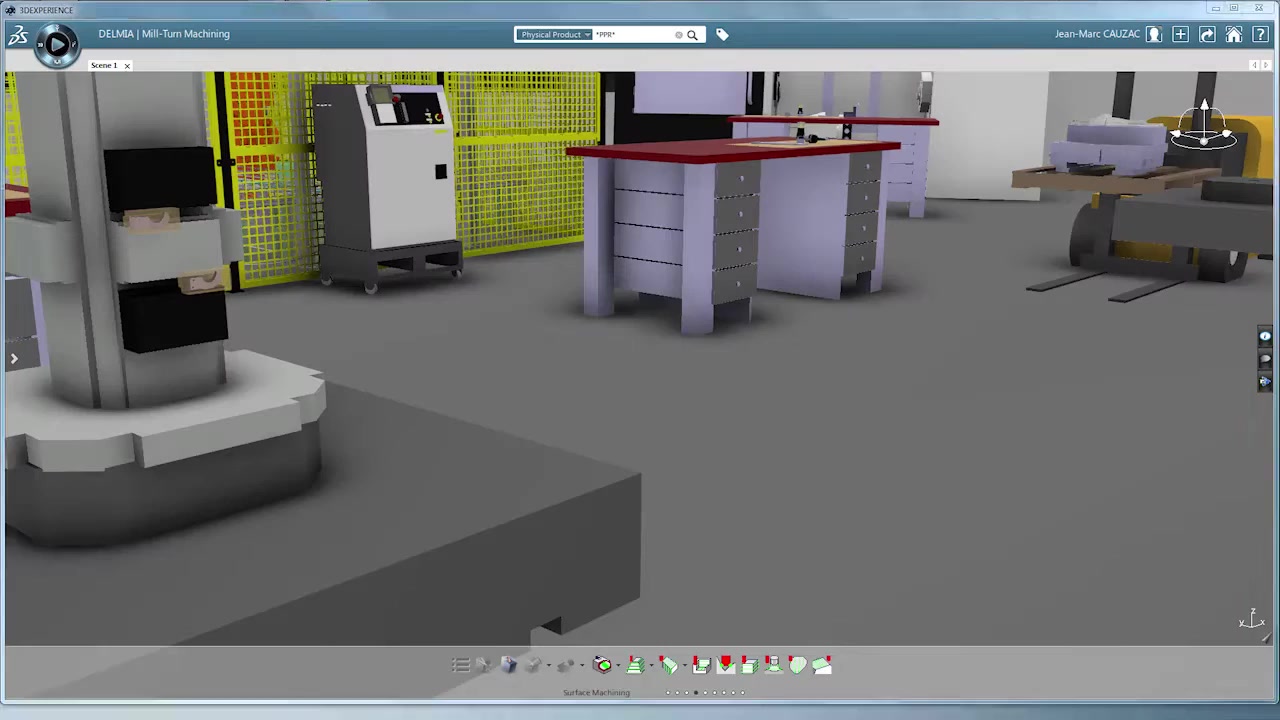
DELMIA 3D factory layout with CNC machines and safety fencing
Who uses this: Manufacturing engineers, plant managers, and industrial engineers who need to validate layout decisions, justify capital expenditure, or reduce risk when reorganizing production lines.

What You Can Do with Factory Simulation Engineer

Layout Design
3D Factory Layout Design and Validation

Design, define, and validate proposed factory layouts in a fully 3D virtual environment. Place machines, workstations, conveyors, aisles, and safety zones exactly as they would appear on the actual floor — then evaluate the layout before anything is moved. Collaborative tools let multiple engineers and managers review the same model simultaneously.

  • Build layouts from 2D floor plans, 3D CAD models, or scanned point cloud data
  • Early detection of layout conflicts and space utilization problems
  • Intuitive guided interface for defining and analyzing material flow scenarios
  • Get stakeholder buy-in on proposed changes without halting production
  • Supports both new facility greenfield design and existing facility brownfield reconfiguration
DELMIA 3D factory layout with CNC machines and safety fencing
For plant managers: Present proposed layout changes to leadership using a realistic 3D model — not a 2D drawing. Visual, data-backed simulations make approval conversations significantly faster.
Flow Simulation
Material and Resource Flow Simulation

Simulate how material, parts, and resources flow through your factory under real operating conditions. Model multiple production scenarios — different shift patterns, machine configurations, or routing sequences — and compare throughput, cycle times, and resource utilization side by side. Find bottlenecks before they become expensive problems.

  • Simulate material and resource flows for new expansions or additional facilities
  • Analyze multiple production scenarios without impacting live operations
  • Optimize resource positioning to maximize equipment utilization
  • Identify bottlenecks early in the planning process before any equipment has been moved
  • Optimize throughput based on station capacity or production shift configurations
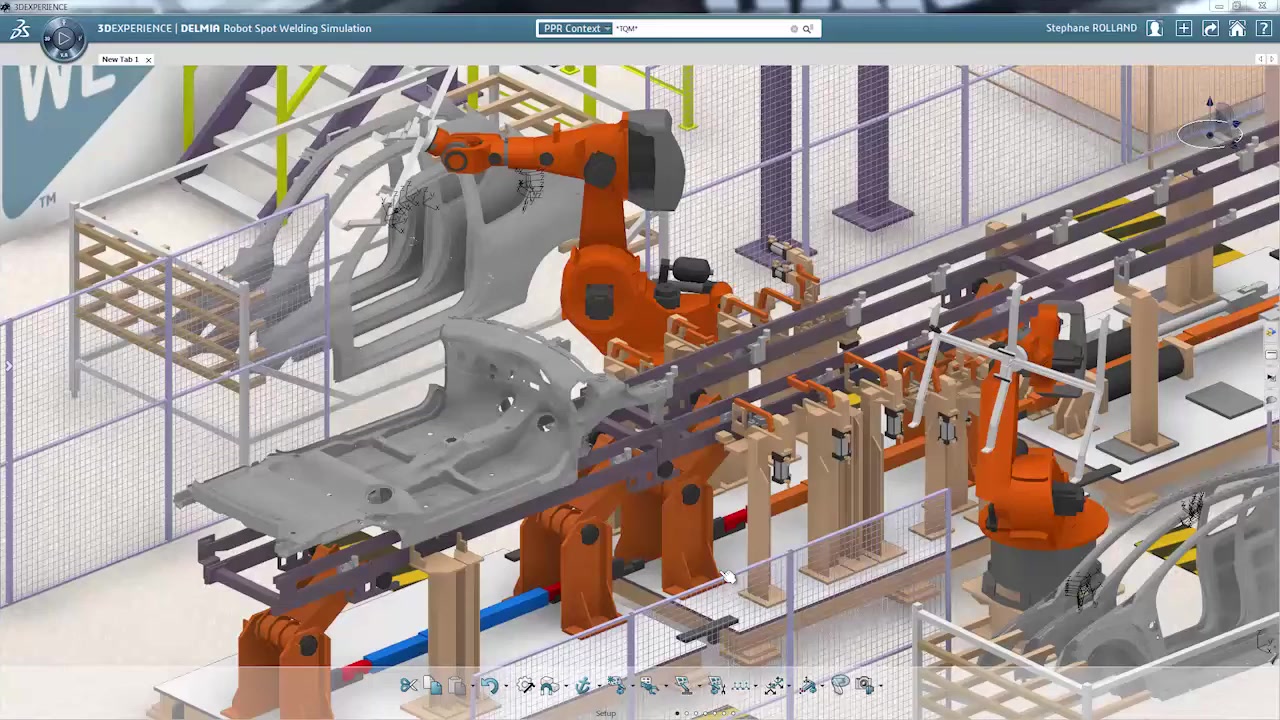
Robot spot welding simulation on full vehicle assembly line
ROI impact: A single simulation run identifying one bottleneck that delays a planned line reconfiguration can save weeks of schedule slip and hundreds of thousands in rework cost. We help you get to that answer quickly.
Process Planning
Comprehensive Process and Resource Planning

Go beyond floor layout to model the full manufacturing system: processes, resources, timing, and dependencies. Leverage existing CNC and robotics data directly from the 3DEXPERIENCE platform so you are working from your actual production data — not assumptions. Track virtual production system performance with accurate simulation output.

  • 3D process and resource planning across all production stages
  • Supports various manufacturing models including assembly, machining, and mixed production
  • Accurate virtual production system tracking with Gantt chart overlays
  • Leverage existing CNC and robotics data from the 3DEXPERIENCE platform
  • Connects to DELMIA Robot Programmer for integrated workcell validation
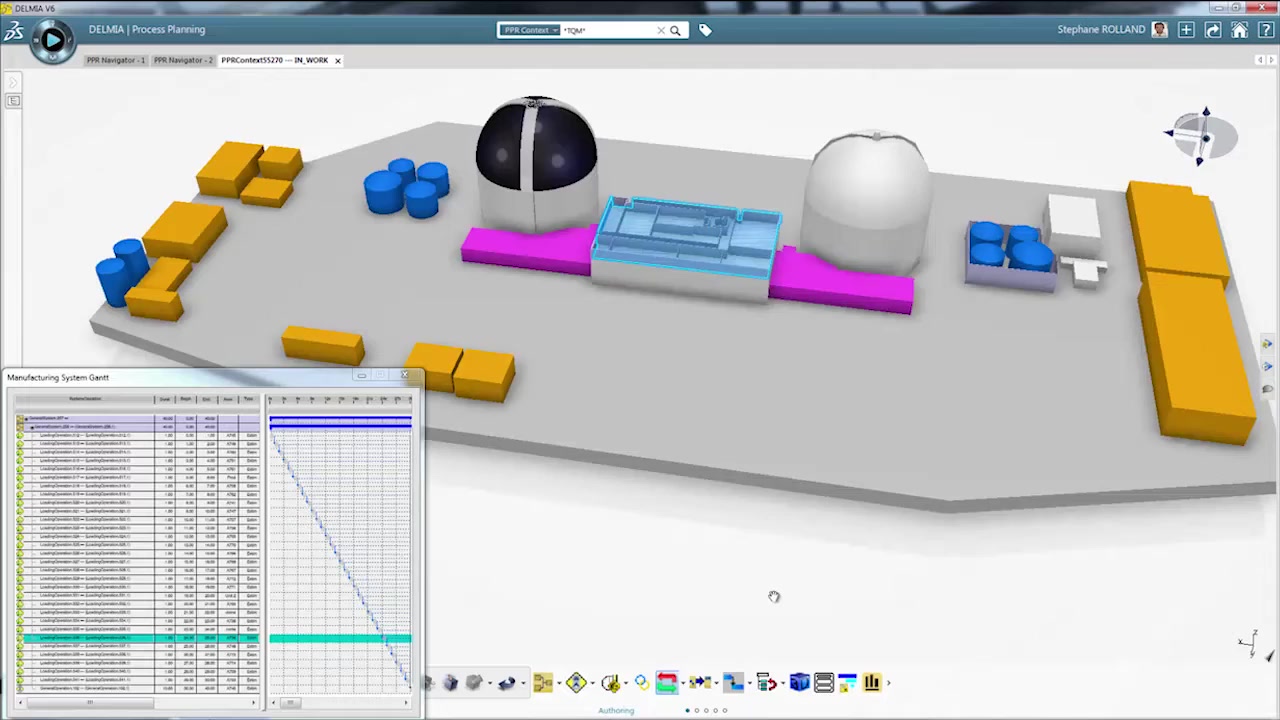
Process planning with Manufacturing System Gantt chart overlay
Platform continuity: Because Factory Simulation Engineer runs on the 3DEXPERIENCE platform, your simulation data lives alongside your design data. No file exports, no version mismatch — one environment for the full manufacturing digital thread.

Platform Benefits

Factory Simulation Engineer is a role on the 3DEXPERIENCE platform — not a standalone tool. That connection delivers advantages isolated simulation software cannot match.

Data Continuity
End-to-End Digital Thread

Design data, process plans, and simulations live on one platform. Changes upstream ripple through automatically — no manual re-entry, no version conflicts.

Collaboration
Multi-Team, Multi-Site Access

Engineers and managers across facilities collaborate on the same model in real time — no travel, no emailed files.

Security
Protected Manufacturing IP

Factory layout and throughput data stays on the platform — not in local files that can walk out the door.

Getting Value from Day One

We configure the simulation around your specific facility questions — not generic demos.

  • Set up around real layout questions your team is currently weighing
  • Integrate with Robot Programmer for combined factory and workcell validation
  • Pilot engagements available — run a simulation against a live facility decision before committing to a full subscription

Common Questions About Factory Simulation Engineer

It simulates discrete event production — how individual parts, batches, workers, and machines interact over time. You can model production flow, resource utilization, cycle times, throughput rates, bottleneck locations, shift schedules, and equipment failure scenarios. The output gives you a data-driven picture of how your factory will actually perform under a given layout or configuration, before you commit to it physically.
Both. Factory Simulation Engineer supports greenfield facility design (starting from a blank floor plan) and brownfield reconfiguration (modeling your existing facility and testing changes to it). For brownfield projects, you can import existing 2D drawings, 3D CAD models of your current layout, or even point cloud scan data from a laser survey of your shop floor as the starting basis for the simulation.
Yes. Both Factory Simulation Engineer and SOLIDWORKS share the same 3DEXPERIENCE platform from Dassault Systemes. Your machine models, part geometry, and process data created in SOLIDWORKS can be referenced directly in the factory simulation environment. This means you are working from your actual engineering data — not re-creating it in a separate tool. The integration also extends to DELMIA Robot Programmer if you are simulating automated workcells as part of the factory layout.
It depends on the complexity of your facility and how much existing data you can bring in. A focused simulation of a single production cell or line section can be set up in days. A full facility model covering multiple lines and shift scenarios typically takes a few weeks. Our team accelerates this significantly by handling the initial configuration, data mapping, and simulation setup — your engineers can then use the model as a working tool rather than spending time building it.
Factory Simulation Engineer is a named-user role on the 3DEXPERIENCE platform, licensed on an annual subscription basis. Pricing depends on the number of users and any additional platform roles you are combining it with. Contact us for a quote tailored to your team size and configuration. We can also discuss pilot arrangements where you evaluate the tool against a specific facility question before committing to a full subscription.
Yes. Factory Simulation Engineer integrates with DELMIA Robot Programmer on the same 3DEXPERIENCE platform. If you are planning a facility that includes robotic workcells, you can simulate the factory-level flow in Factory Simulation Engineer while validating the individual robot programs in Robot Programmer — all within the same data environment. Morphos supports both products, so we can help you build an integrated simulation that covers both facility layout and robotic automation in one engagement.
A 2D floor plan tells you whether equipment physically fits. Factory Simulation Engineer tells you how the facility performs — throughput rates, cycle times, bottleneck locations, resource utilization, and the downstream impact of adding or moving a machine. It runs discrete event simulation over time, so you can see how the factory behaves under real operating conditions, not just whether it looks right on paper. That difference is where the ROI lives.

Ready to simulate your factory before you move a machine?

We can walk you through a demo using a scenario from your own facility, put together a quote, or discuss a pilot engagement to prove value before you commit.

Get a Quote Talk to a Specialist