
SOLIDWORKS® Simulation
FEA structural analysis built directly into SOLIDWORKS — no file exports, no software switching. Validate your designs before material hits the machine.
SOLIDWORKS Simulation
SOLIDWORKS Simulation is a portfolio of Finite Element Analysis (FEA) tools embedded directly inside SOLIDWORKS. There is no file export, no separate meshing application, and no context-switching between tools. Your CAD geometry, materials, and configurations feed straight into the simulation environment — and results update automatically when the design changes.
- FEA runs inside SOLIDWORKS — same interface, same file, same model tree. Setup time drops dramatically compared to standalone analysis tools.
- Three tiers cover everything from linear static stress to nonlinear dynamic loading, fatigue, drop test, and topology optimization.
- Built for manufacturing validation: confirm part strength before cutting metal, catch failure modes during design review — not after production.
For CNC shops and contract manufacturers, SOLIDWORKS Simulation answers the question your customers are already asking: "Will this part hold up?" Having that answer in-house — backed by FEA data, not just engineering judgment — changes how you quote, design, and deliver.
 Morphos 3D is an authorized SOLIDWORKS reseller specializing in manufacturing validation workflows.
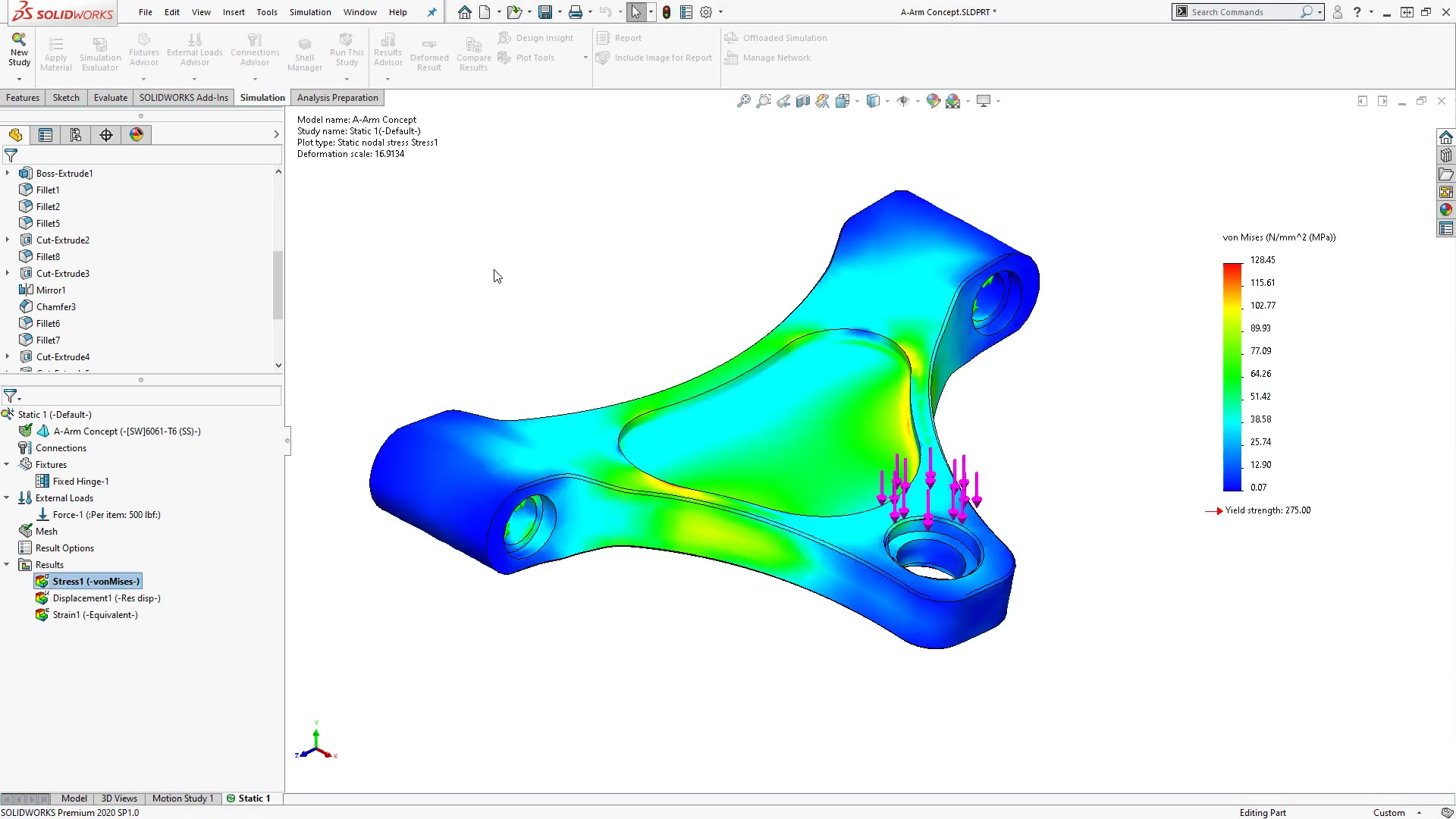
SOLIDWORKS Simulation Packages
Three tiers, each building on the one below. Start with the validation you need today — upgrading is straightforward as your analysis requirements grow.
Linear static stress, thermal analysis, frequency studies, and motion simulation for structural validation.
- Linear static stress (FEA) for parts and assemblies
- Thermal analysis (steady-state and transient)
- Frequency — natural modes of vibration
- Time-based motion simulation
- Design comparison studies
- Stress hot spot diagnostics
Standard plus fatigue, topology optimization, buckling, pressure vessel design, and load case manager.
- Fatigue simulation (high-cycle)
- Topology optimization studies
- Pressure vessel design studies
- Buckling and collapse simulation
- Event-based motion simulation
- Load case manager
- 2D simplification (plane stress/strain, axisymmetric)
Professional plus nonlinear analysis, drop test, composites, and four linear dynamic study types.
- Nonlinear static and dynamic analysis
- Linear dynamic simulation (4 study types)
- Drop test simulation
- Composites structural analysis
- Complex material models (rubbers, plastics, post-yield metals)
- Submodeling simulation
Compare All Features
| Capability | Standard | Professional | Premium |
|---|---|---|---|
| Linear Static Stress Analysis (FEA) | ✓ | ✓ | ✓ |
| Thermal Analysis | ✓ | ✓ | ✓ |
| Frequency / Natural Modes | ✓ | ✓ | ✓ |
| Time-Based Motion Simulation | ✓ | ✓ | ✓ |
| Design Comparison Studies | ✓ | ✓ | ✓ |
| Stress Hot Spot Diagnostics | ✓ | ✓ | ✓ |
| Fatigue Simulation (High-Cycle) | — | ✓ | ✓ |
| Topology Optimization | — | ✓ | ✓ |
| Pressure Vessel Design | — | ✓ | ✓ |
| Buckling / Collapse Simulation | — | ✓ | ✓ |
| Event-Based Motion Simulation | — | ✓ | ✓ |
| Load Case Manager | — | ✓ | ✓ |
| 2D Simplification | — | ✓ | ✓ |
| Nonlinear Static Analysis | — | — | ✓ |
| Nonlinear Dynamic Analysis | — | — | ✓ |
| Linear Dynamic Studies (4 types) | — | — | ✓ |
| Drop Test Simulation | — | — | ✓ |
| Composites Analysis | — | — | ✓ |
Not sure which tier fits your validation needs? We can help you map your requirements to the right package. Talk to us
More Than a License — a Manufacturing Simulation Partner
Most simulation software vendors hand you a license and a manual. We take a different approach. Our team has direct experience on the shop floor — we understand the pressure you face when a customer asks if a part will hold up, and we know what a usable simulation workflow actually looks like in a busy engineering environment.
- Configure simulation studies that match your actual manufacturing validation use cases
- Build reusable study templates for common part families (fixtures, brackets, housings, structural weldments)
- Define load cases that reflect your real operating conditions, not textbook examples
- Train your engineers on simulation setup, result interpretation, and report generation
- Ongoing support as your analysis requirements evolve — from Standard to Professional to Premium