SOLIDWORKS® Plastics

SOLIDWORKS Plastics

Predict injection molding defects before you cut the mold.

Simulate fill, pack, cooling, and warp inside your CAD environment. Catch sink marks, weld lines, air traps, and short shots before steel is cut — and eliminate the cost of mold rework.

4,000+
Thermoplastic grades in the material library

SOLIDWORKS Plastics

Injection molding simulation embedded inside SOLIDWORKS. Run fill, pack, cooling, and warp studies during design — when a gate reposition costs nothing and a mold revision costs tens of thousands. Catch defects before steel is cut.

  • Fill time and weld line / air trap detection
  • Sink mark prediction after ejection
  • Packing phase: shrinkage, gate freeze, hot spots
  • Cooling line simulation and warp analysis (Premium)
  • Runner and gate design wizard for multi-cavity molds
SOLIDWORKS Authorized Reseller Morphos 3D is an authorized SOLIDWORKS reseller with deep manufacturing expertise.
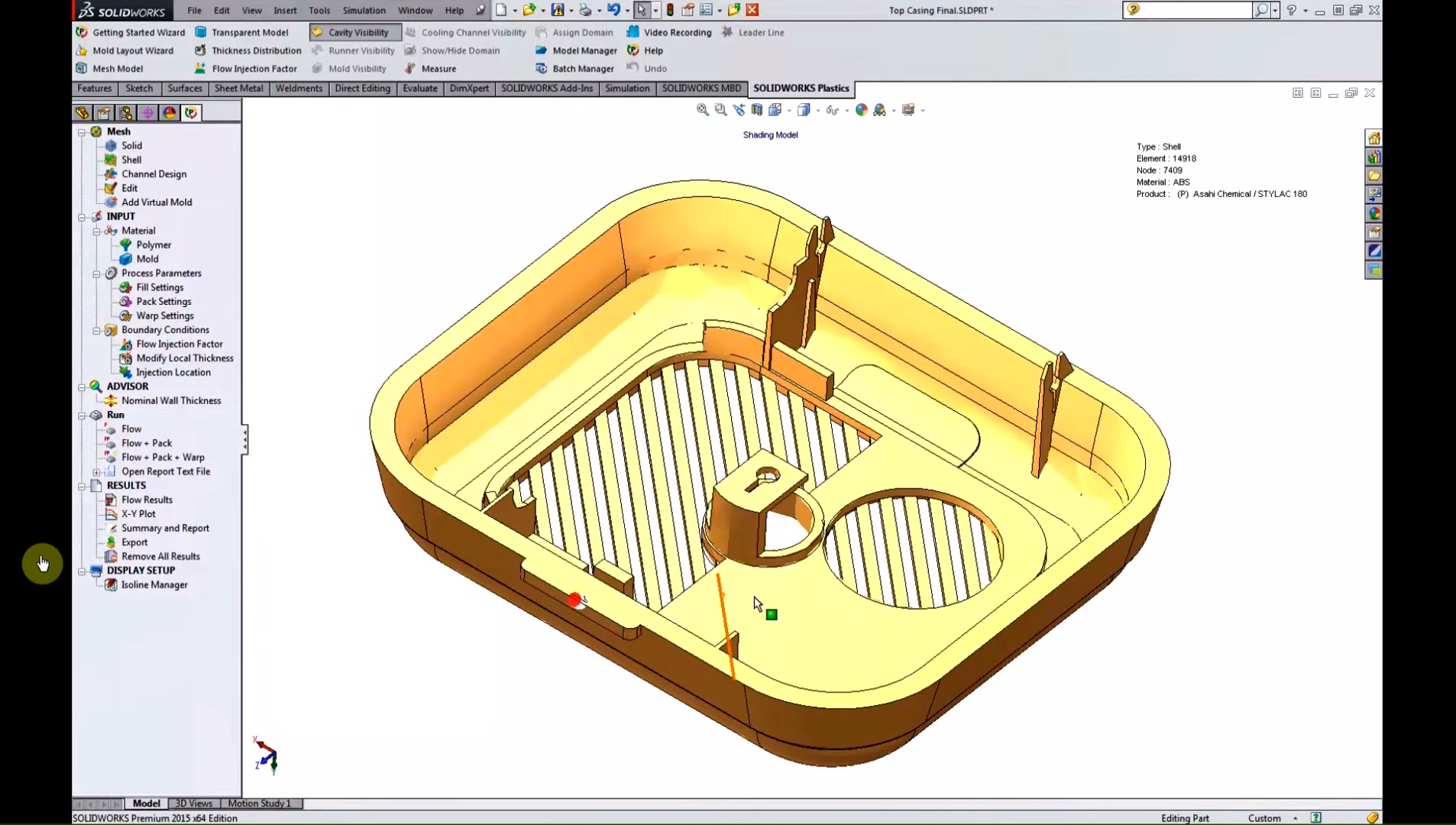
Plastics mesh setup with material and process parameters
Morphos advantage: We do not just sell the license — we help your team set up Plastics studies correctly, interpret simulation results in the context of your tooling decisions, and connect findings back to design changes that actually stick.

What You Can Do with SOLIDWORKS Plastics

Fill Analysis
Predict Fill Before the Mold Is Cut

See melt front progression, pressure distribution, weld lines, and short shot risk — all before tooling is committed.

  • Instantaneous fill time heatmap from first-fill to last-fill
  • Pressure at end of fill and flow front temperature
  • Weld line and air trap location mapping
  • Short shot risk identification
  • Confidence of fill indicator for quick go/no-go read
  • Clamp force estimation for press selection
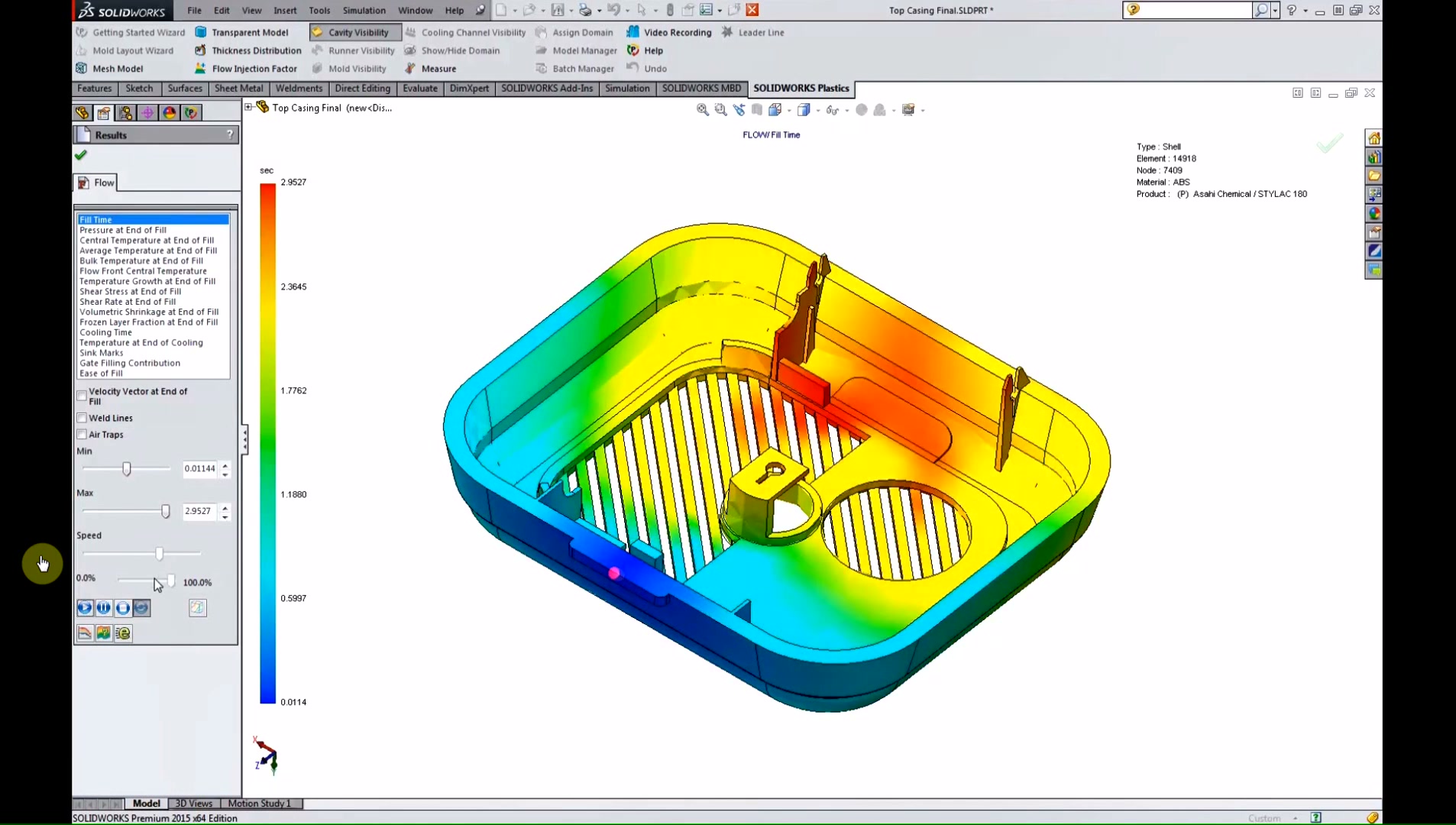
Fill time heatmap from first-fill to last-fill
For mold designers: Seeing fill patterns before steel is cut means you can reposition gates, adjust wall thickness, or change material selection while those decisions are still low-cost. One avoided tooling revision pays for the software many times over.
Defect Detection
Sink Marks, Warp, and Cooling Analysis

Standard predicts sink marks; Professional adds packing phase; Premium adds full cooling and warp analysis for distortion prediction.

  • Sink mark depth and location map post-ejection
  • Packing phase: temperature, pressure, and shrinkage distributions
  • Gate freeze and hot spot detection for cycle time reduction
  • Cooling channel simulation with baffles and bubblers (Premium)
  • Conformal cooling channel support (Premium)
  • Warp displacement from residual stress (Premium)
Sink marks and cooling analysis result map
For contract manufacturers: When a customer sends you a part to mold and you have concerns about manufacturability, Plastics gives you documented simulation results to support the design review conversation — not just engineering opinion.
Runner & Gate Design
Multi-Cavity Molds and Feed System Optimization

Analyze the complete feed system alongside the part cavity — runner wizard, runner balancing, multi-cavity and family mold layouts.

  • Runner design wizard for automated sprue, runner, and gate creation
  • Runner balancing for even fill in multi-cavity molds
  • Single-cavity, multi-cavity, and family mold layouts
  • Hot runner and cold runner simulation
  • Cycle time estimation including cooling phase
  • Mold insert impact simulation
Standard, Professional, Premium tier comparison overview
Why this matters: Unbalanced runners in a family mold cause some cavities to fill faster than others, leading to flash on one part and short shots on another. Simulation catches this at the design stage, not during first article.

SOLIDWORKS Plastics Packages

Three tiers, each building on the one below. Start with Standard for part-level fill analysis and grow into cooling and warp optimization as your mold complexity demands.

Plastics Standard
Part-Level Fill Analysis

Single-cavity fill analysis — weld lines, air traps, sink marks, short shot risk, clamp force. Embedded in SOLIDWORKS.

  • Fill phase analysis (pressure, temperature, weld lines, air traps)
  • Sink mark location and depth prediction
  • Fill time and confidence of fill indicator
  • Clamp force estimation
  • 4,000+ material database
  • eDrawings result export
Get a Quote
Plastics Premium
Cooling & Warp Analysis

Adds cooling line simulation and warp analysis — optimize cycle time and predict distortion before steel is cut.

  • Everything in Professional
  • Cooling line simulation (straight, baffles, bubblers)
  • Conformal cooling channel support
  • Mold temperature at cooling end
  • Warp / displacement from residual stress
  • Export to ABAQUS, ANSYS, DigiMat for nonlinear analysis
Get a Quote
Available on Device Term License (machine-locked, 3-month or 1-year) or Single-User Subscription (person-tied, any device). Contact us to discuss which fits your shop.

More Than a License — A Manufacturing Partner

We configure your first Plastics study and translate simulation results into real tooling decisions — not generic software support.

  • First study setup: meshing, material inputs, process parameters
  • Result interpretation tied to gate placement and wall thickness decisions
  • Tier upgrade support as your mold complexity grows

Common Questions About SOLIDWORKS Plastics

SOLIDWORKS Plastics is sold as a subscription under either a Device Term License (machine-locked, available in 3-month or 1-year terms) or a Single-User Subscription (person-tied, usable on any device). Pricing differs by tier — Standard, Professional, and Premium each add capability and cost. As an authorized SOLIDWORKS reseller, Morphos 3D can provide a current quote. Contact us and we will get back to you quickly.
No. SOLIDWORKS Plastics is fully embedded as an add-in inside SOLIDWORKS 3D CAD. It uses the same interface — toolbars, menus, and right-click menus — and operates directly on your existing SOLIDWORKS part and assembly files. There is no file export step and no separate application to launch. It also respects SOLIDWORKS materials and configurations, so you can test multiple material options or part configurations without rebuilding your study.
Standard analyzes the plastic part in a single cavity — fill phase, weld lines, air traps, sink marks, and cooling time estimates. Professional adds mold-level analysis: you can simulate the complete feed system (sprues, runners, and gates), run multi-cavity and family mold layouts, balance runners across cavities, and add packing phase analysis for shrinkage and hot spot detection. If you are designing or validating tooling rather than just parts, Professional is the correct starting point.
Premium adds two capabilities that Standard and Professional do not include: full cooling line simulation and warp analysis. Cooling simulation lets you model coolant flow through your mold's channels — including baffles, bubblers, and conformal cooling geometries — and see mold temperature distribution at the end of the cooling phase. Warp analysis predicts how residual stress causes the part to distort after ejection. If you have cosmetic parts with tight flatness requirements, or you are optimizing cycle time on a high-volume production mold, Premium is the tier you need.
Yes. SOLIDWORKS Plastics is an add-in that works alongside any current SOLIDWORKS Design license — Standard, Professional, Premium, or Ultimate. It runs on the same seat and uses the same part and assembly data you are already working with. No separate CAD installation or data conversion is required. If your SOLIDWORKS subscription is current, adding Plastics is a straightforward license addition that Morphos can process for you.
Simulation accuracy depends on the quality of your material data, process parameter inputs, and mesh settings. With calibrated thermoplastic data from the SOLIDWORKS Plastics database and realistic process conditions, fill time and defect location predictions are strong enough to drive confident gate placement and wall thickness decisions. Absolute warp magnitudes are harder to predict with high precision, but comparative studies — comparing two cooling layouts or two gate positions — are reliable and highly actionable. Morphos helps you set up studies correctly so you get engineering-grade results from the start.

Ready to stop guessing and start simulating?

Talk to Morphos 3D about SOLIDWORKS Plastics. We can demo the fill analysis workflow on a part like yours, help you choose the right tier, and get you licensed and up and running fast.

Get a Quote Talk to a Specialist