
SOLIDWORKS Inspection
Stop manually ballooning drawings and re-entering dimension values. SOLIDWORKS Inspection automates your FAI workflow — connecting design data directly to QA with no transcription errors.
SOLIDWORKS Inspection
SOLIDWORKS Inspection automates ballooned inspection drawings and FAI reports directly from your 3D models and 2D drawings — extracting every characteristic automatically, including GD&T symbols and tolerances, and populating AS9102, PPAP, or custom Excel templates without manual re-entry.
- Automatic ballooning of engineering drawings from SOLIDWORKS files, PDF, TIFF, and DXF/DWG sources
- OCR-powered dimension extraction from scanned or PDF drawings — reads nominal values, tolerances, and GD&T symbols
- Export to AS9102 and PPAP Excel templates, PDF ballooned drawings, and QIF format
- CMM import — pulls measured values directly from Coordinate Measuring Machine output
- Graphical pass/fail status — green, yellow, or red per characteristic based on tolerance
- PDF and 3D PDF export of ballooned drawings for customer or auditor delivery
- Revision management — compare drawing revisions to identify changes and update inspection projects
- PDM integration — works with SOLIDWORKS PDM for controlled project and revision management
 Morphos 3D is an authorized SOLIDWORKS reseller with deep manufacturing expertise.

What You Can Do with SOLIDWORKS Inspection
Automatically identifies and balloons every inspectable characteristic from SOLIDWORKS drawings, PDFs, or TIFFs — including GD&T callouts, tolerances, and surface finish symbols via OCR.
- Automatic extraction from SOLIDWORKS drawings, PDF, TIFF, DXF, DWG, and 3D CAD files
- OCR reading of nominal values, plus/minus tolerances, and dimension types
- GD&T and surface finish symbol recognition
- Customizable balloon shape, color, and size by criticality or inspection method
- Adjustable balloon placement without losing characteristic linkage
- Automatically generated Bill of Characteristics (BOC) with full dimension data

Exports to AS9102, PPAP, or custom Excel templates — with ballooned drawing, Bill of Characteristics, and measured values from caliper or CMM import.
- AS9102 First Article Inspection report template (aerospace)
- PPAP Production Part Approval Process template (automotive)
- Custom Excel template support for customer-specific formats
- PDF and 3D PDF export of ballooned drawings
- CSV and XML export for quality systems and databases
- Direct publish to Net-Inspect quality management platform
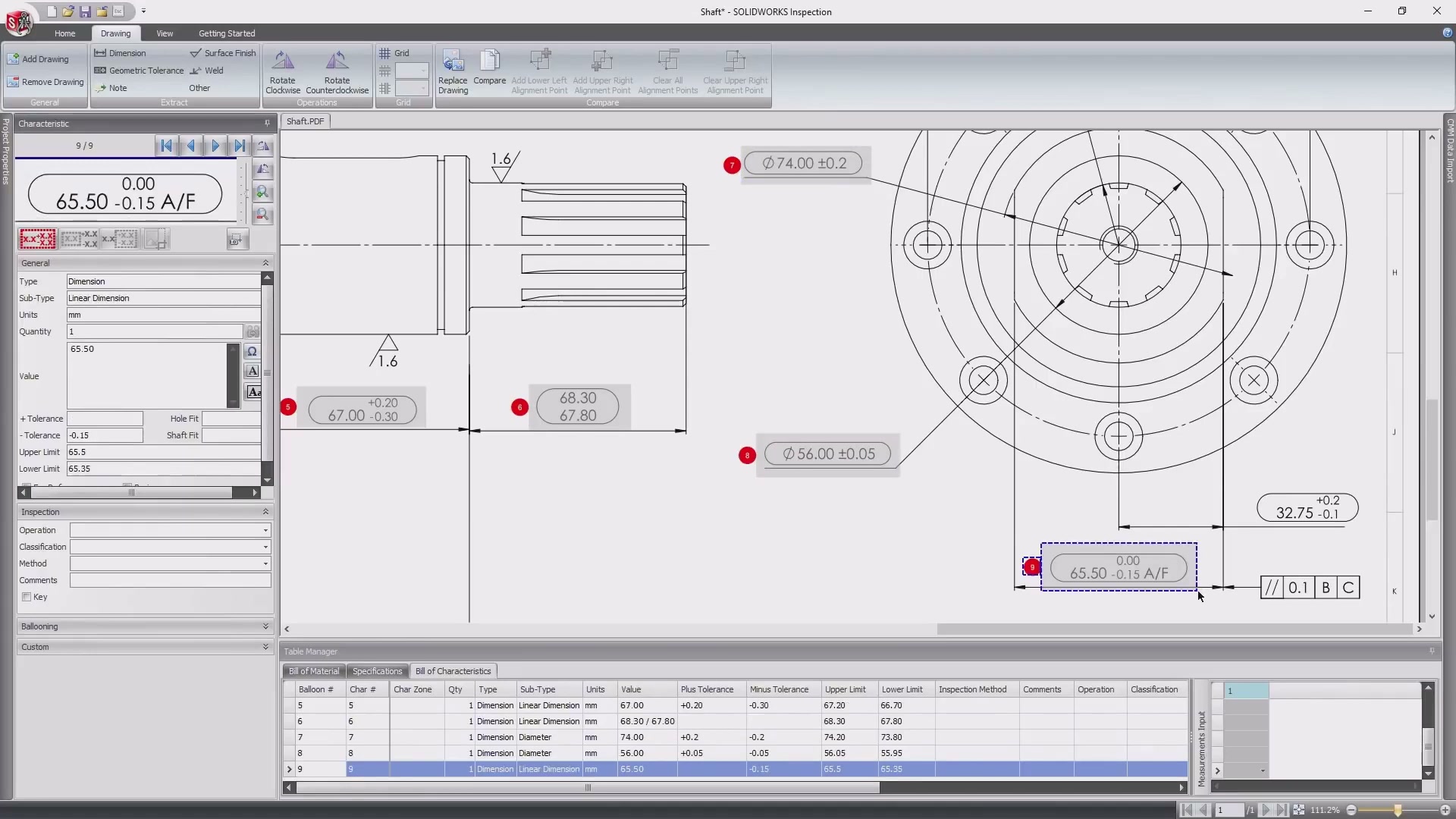
Enter measured values manually, via digital caliper, or imported from CMM. Pass/fail status calculated automatically against design tolerances — green, yellow, or red per characteristic.
- Direct measured value entry per characteristic (manual or digital caliper)
- CMM result import for automated measurement population
- Graphical pass/fail highlighting: green (in tolerance), yellow (marginal), red (out of tolerance)
- 3D PMI (Product and Manufacturing Information) support from 3D CAD models
- Works with SOLIDWORKS parts and assemblies with PMI annotations
- Acceptance Quality Limit (AQL) sampling plan support

SOLIDWORKS Inspection Packages
Two tiers. Standard automates ballooning and report creation from any file type. Professional adds measured value entry, CMM integration, and 3D PMI support.
Available as both a standalone application and a SOLIDWORKS add-in. Works with SOLIDWORKS files, PDF, TIFF, and DXF/DWG. Automates ballooning, generates AS9102 and PPAP Excel reports, and exports PDF ballooned drawings.
- SOLIDWORKS add-in and standalone application
- SOLIDWORKS drawing, part, and assembly file support
- PDF and TIFF file support with OCR extraction
- DXF/DWG file support
- Automatic ballooning with GD&T recognition
- AS9102 and PPAP Excel template export
- PDF and 3D PDF ballooned drawing export
- Drawing revision comparison and management
- PDM integration for project file management
Extends Standard with direct measured value entry, CMM result import, 3D PMI support, and graphical pass/fail status. Required for shops producing inspection reports with actual measurement values.
- Everything in Standard
- Manual or digital caliper measured value entry
- CMM result import for automated measurement population
- Graphical pass/fail status (green / yellow / red)
- 3D PMI support from SOLIDWORKS parts and assemblies
- 2D/3D CAD file support for other CAD formats
- Acceptance Quality Limit (AQL) sampling plan
- CSV and XML export for quality systems
- Net-Inspect direct publish
Configured for Your Customer Requirements — Not Just Installed
We configure Inspection templates to match your customer requirements — AS9102 Form 1/2/3 for aerospace, PPAP for automotive — so your first report passes customer receiving without revision requests. For shops on SOLIDWORKS PDM, we connect Inspection to your vault so inspection projects follow drawing revisions and quality documentation is controlled alongside your CAD data.